WEP Tech Context Map & Ecosystem Architecture
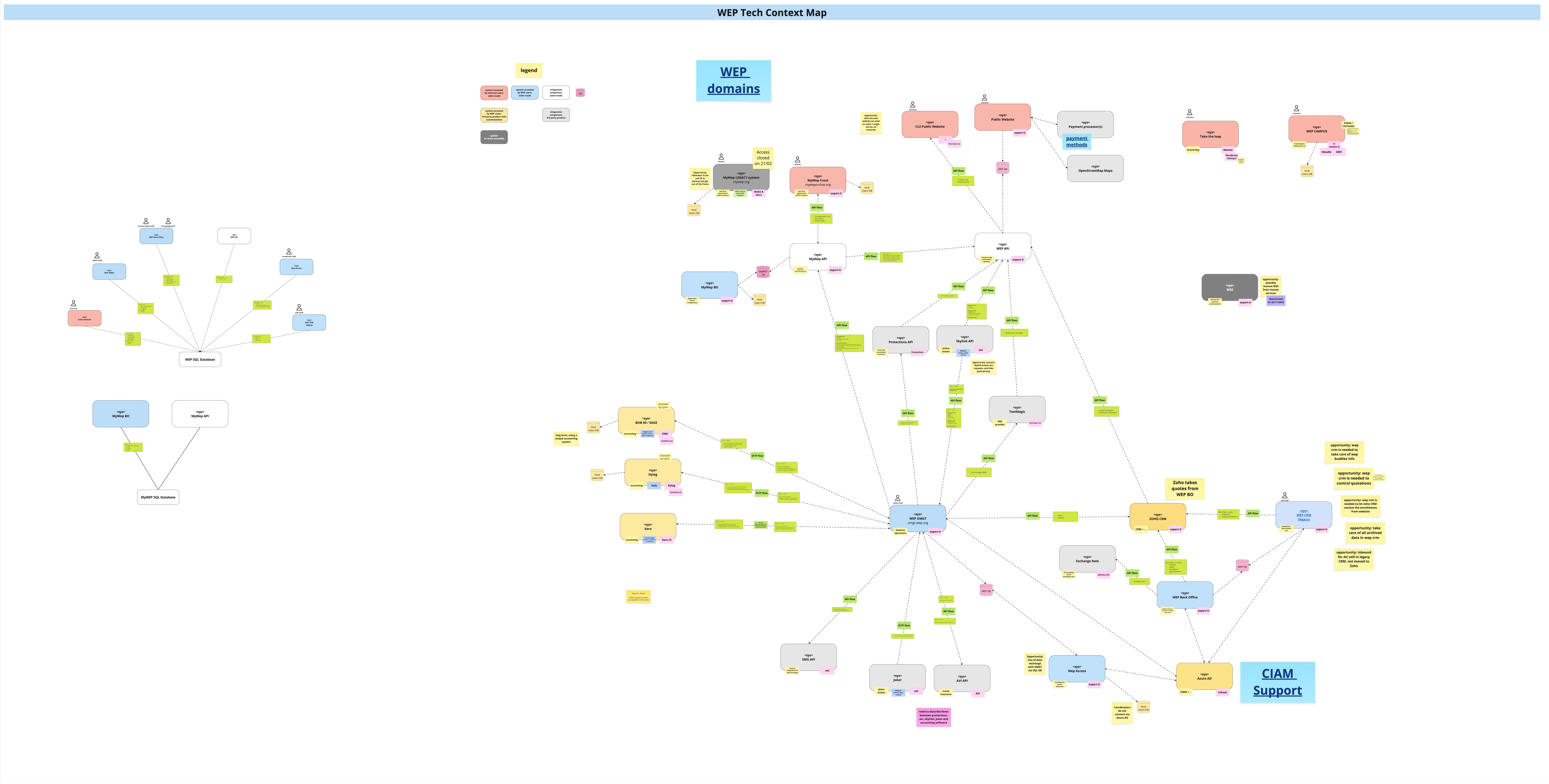
This architecture represents WEP's Distributed Service Ecosystem, following Domain-Driven Design (DDD) principles. It is designed to bridge powerful external SaaS platforms with bespoke internal services through a centralized orchestration layer.
You can click on the image below to view it in full size or use the browser zoom to explore the details of the hubs and spokes.
🧭 Architectural Clusters
The ecosystem is divided into several logical areas, each serving a specific business function:
🔴 External SaaS Layer (Integrations)
Positioned at the top of the map, these are heavy-duty third-party systems that handle core business operations:
- CRM & Sales: (e.g., Salesforce) managing leads and student profiles.
- ERP & Finance: (e.g., Microsoft Dynamics/Odoo) for accounting and program costs.
- Support: (e.g., Zoho Desk) handling customer and partner inquiries.
🏢 Internal Business Domains (The Core)
The centered grey boxes represent WEP-owned microservices. Each box is a Bounded Context—a specific area of WEP's unique business logic:
- Program Enrollment
- Placement Management
- Travel & Logistics
🔐 CIAM & Identity (Security)
Located in the bottom-right cluster, the Customer Identity and Access Management system provides:
- Unified Auth: Single Sign-On (SSO) across all portals.
- Security Standards: leveraging OIDC and SAML for secure student and partner access.
💻 Application Layer (User Experience)
The peripheral blue boxes represent our digital touchpoints:
- Student/Parent Portals: Real-time updates and on-program support.
- Admin Dashboards: WEP staff internal management tools.
- Host Family Portals: Dedicated interfaces for hosting management.
🔌 Communication Strategy
The map shows a "Hub & Spoke" model where a central Integration Hub acts as the brain.
- Synchronous (REST/GraphQL): Used for immediate actions like checking application status.
- Asynchronous (Webhooks/Events): Used for background processes, such as notifying the ERP after a student payment is confirmed.
— Technical Architecture Team